
Overview
IP cameras and network video recorders (NVRs) are now standard at retail, manufacturing and warehousing sites. They are used for different purposes:
- A retail store uses CCTV for loss prevention and for the safety of customers and staff.
- A manufacturing plant uses cameras to verify that products are assembled correctly.
- A warehouse shipping desk records packing so that, if a customer reports a missing item, the recording can serve as proof of shipment.
In each case, the people who watch the video are usually somewhere else: a central security desk, a regional office or headquarters. This application note explains how ChiefNET SD-WAN gives those people secure access to cameras and NVRs at every site without exposing any of that equipment to the Internet.
The Challenge
Most sites record video on a local NVR, and monitoring staff need both live view and playback of recorded footage. The common way to provide remote access is to open RTSP, HTTP or vendor-specific ports for each camera or NVR on the site’s Internet router. This creates several problems:
- Vulnerable devices. Many cameras and NVRs run software that is rarely updated, and several models have known vulnerabilities.
- Weak access control. Cameras and NVRs usually support only a simple username and password. Devices with stronger access controls cost more to buy and maintain.
- Credential theft. Once ports are open to the Internet, anyone with stolen or guessed credentials can view the streams, from anywhere.
- Uncontrolled outbound traffic. Cameras that can reach the Internet may contact external cloud services that the organisation did not intend to use.
- Bandwidth contention. Video competes with business traffic on the same site link, and playback of long recordings can saturate a connection.
To keep video private, the traffic must stay inside the organisation’s own network.
The ChiefNET Solution
ChiefNET connects the monitoring locations, camera sites and NVR sites in a single private network built on encrypted tunnels. A pre-provisioned CPE is installed at each site; no local configuration is required.
No open ports at any site
With ChiefNET, there is no need to open any public port on any camera, NVR or router. All ChiefNET CPE WAN ports are closed by default, and the CPE only makes outbound connections to the ChiefNET Cloud WAN and Orchestrator. ChiefNET verifies this with Nessus and Nmap sweeps and provides a periodic WAN-side vulnerability assessment report.
Monitoring staff reach cameras and NVRs through the encrypted tunnels as if they were on the same private network. Even if an outsider learns a staff member’s camera credentials, they cannot reach the video streams unless they are on a location connected by ChiefNET.
Encrypted, authenticated transport
All traffic between sites is encrypted with AES-256. Each CPE has its own X.509 certificate, and tunnels use mutual certificate-based authentication, so only the organisation’s own devices can join the network. Each customer’s traffic is isolated from every other customer’s.
Restricting who can see which camera
ChiefNET traffic policies use 5-tuple rules (source and destination address or subnet, protocol, and source and destination ports) to control access. Administrators can allow only the security desk’s subnet, or specific workstations, to reach a given camera or NVR, and drop everything else.
Cameras and NVRs can also be marked as enterprise-only systems: they are permitted to communicate over the enterprise tunnels but not directly with the Internet. This stops cameras from contacting outside services while keeping them reachable by authorised staff.
Prioritising video when links are busy
ChiefNET’s QoS engine lets administrators assign a real-time profile to RTSP and other media flows, so that live video keeps low latency even when the link is congested. Playback of long recordings can be given a maximum bandwidth limit so that it does not crowd out billing, ERP or other business traffic. At sites with two WAN links, video can be steered to a specific link, or kept off a metered 4G backup entirely using exclusive WAN port selection.
Sites with existing firewalls or overlapping addresses
Where a site already has a firewall handling general Internet traffic, the ChiefNET CPE can be installed as a LAN-side device that carries only surveillance traffic. In this arrangement, WAN failover and load balancing remain the job of the existing firewall.
NVRs and cameras are often installed with default private address ranges, so two sites may use the same subnet. ChiefNET’s DNAT within the secure SD-WAN network lets a site with an overlapping address space publish its NVR to other sites through the tunnel, without changing the camera installation.
One network for video and business traffic
Retail and manufacturing sites also need access to headquarters and cloud applications such as ERP, billing and finance systems. The same ChiefNET CPE carries both surveillance and business traffic, with separate policies for each, so organisations do not need a separate network for video.
Monitoring and alerts
The Orchestrator shows the status of every WAN port, LAN port and tunnel. A LAN port going down, often the first sign that a camera switch has lost power, raises an alert. Administrators can configure ping-latency monitoring to an NVR so that loss of reachability is reported by email or Telegram.
Reference Architecture
The diagram shows a retail store, a warehouse with an on-site NVR and a factory, each with a CN-4 CPE, connected through the ChiefNET Cloud WAN to a monitoring centre and to headquarters. The Internet has no inbound path to any site. Access policies and QoS are defined centrally in the ChiefNET Orchestrator and pushed to every CPE.
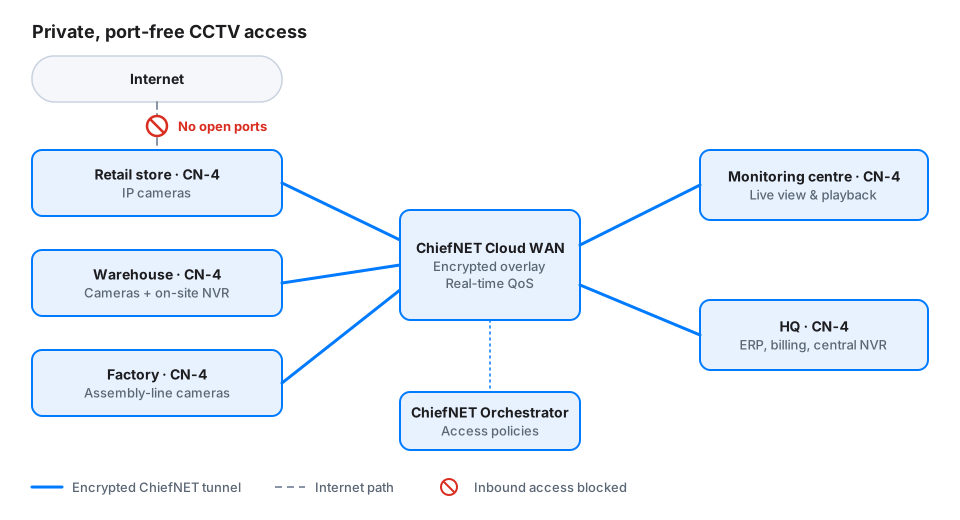
Camera sites and NVRs connect to a monitoring centre over ChiefNET Cloud WAN; no inbound ports are open to the Internet.
Key Benefits
- No exposed video equipment. Cameras and NVRs are never reachable from the Internet, which removes the most common route to unauthorised viewing.
- Stolen credentials are not enough. An attacker must also be on an authorised ChiefNET site to reach a stream.
- Least-privilege access. Only named sites, subnets or workstations can reach a given camera or NVR.
- Smooth live view. Real-time QoS keeps live video responsive, while playback is rate-limited to protect business traffic.
- Fast rollout. Pre-provisioned CPEs require only power and cables at each site.
- One platform. Surveillance, ERP and billing traffic share a single managed network with separate policies.
Capability Map
| ChiefNET capability | How it is used here |
|---|---|
| No open WAN ports, outbound-only connections | Removes the need to publish camera or NVR ports to the Internet |
| AES-256 tunnels with mutual X.509 authentication | Encrypts video streams and admits only the organisation’s CPEs |
| 5-tuple traffic policies | Limits each camera or NVR to authorised monitoring subnets or workstations |
| Enterprise-only systems policy | Prevents cameras and NVRs from reaching the Internet directly |
| Real-time QoS and maximum bandwidth limits | Keeps live view smooth and stops playback from saturating links |
| DNAT within the SD-WAN network | Reaches NVRs at sites with overlapping private address ranges |
| Exclusive WAN port selection | Keeps video traffic off metered backup links |
| Port, tunnel and ping-latency alerts | Reports camera-network and NVR reachability problems by email or Telegram |
Deployment Summary
- Inventory camera, NVR and monitoring locations, with the subnets and ports each camera system uses.
- Choose the placement at each site: as the site gateway, or as a LAN-side device alongside an existing firewall.
- Define access policies, enterprise-only rules and QoS profiles in the ChiefNET Orchestrator.
- Ship pre-provisioned CPEs; site staff connect power, the WAN link and the camera network.
- Close any previously opened camera or NVR ports on site routers, then verify live view and playback from the monitoring centre.
Conclusion
Opening camera and NVR ports to the Internet is convenient but leaves video exposed to anyone with a password. ChiefNET SD-WAN replaces those open ports with an encrypted private network that connects monitoring staff to cameras at every site, limits who can see each stream, and keeps video flowing alongside business traffic. Because the same network also serves ERP, billing and other central applications, organisations get better security and a simpler network in one deployment.